
Every number in this guide is checked directly against YouTube’s own Help Center documentation, not pulled from another blog’s list and republished. That distinction matters more than it sounds like it should, since channel art guides circulating online disagree with each other constantly — some cite a banner safe area of 1235×338 pixels, others cite 1546×423, and without knowing where each number comes from, it’s hard to know which one to trust. Both are correct; they’re the same safe zone measured against two different upload sizes, and the difference between them is explained below. This guide covers every image asset a YouTube channel uses — banner, profile picture, thumbnail, and watermark — with the exact current specifications for each.
Why So Many Sources Disagree on the Same Numbers
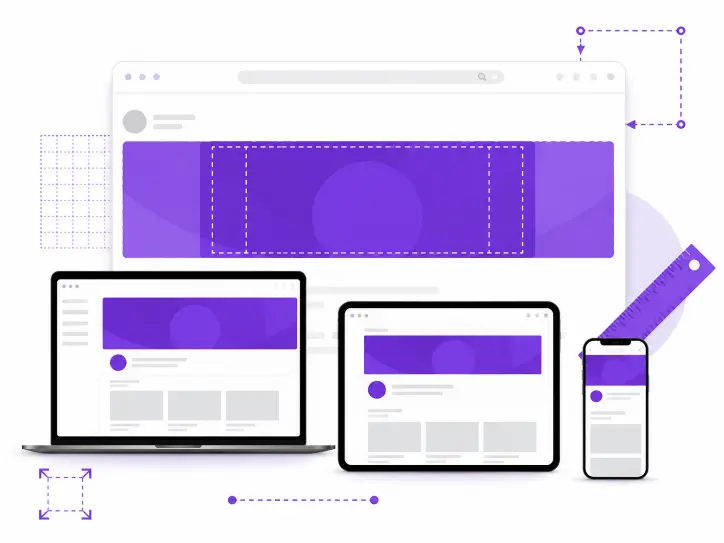
YouTube’s banner system supports two valid upload sizes: a minimum of 2048×1152 pixels and a recommended size of 2560×1440 pixels, both at a 16:9 aspect ratio. The safe area — the zone guaranteed to stay visible across every device — is the same proportional region in both cases, roughly the center 60% of the width and 29% of the height. At the minimum upload size, that works out to 1235×338 pixels. At the recommended upload size, the same proportional zone works out to roughly 1546×423 pixels. Neither number is wrong. They’re just describing the same safe zone against two different canvas sizes, which is exactly the kind of detail that gets lost when guides copy a number without explaining where it came from.
This guide states both, tied to the upload size each one applies to, so there’s no ambiguity about which to use depending on which size you upload at.
Channel Banner Dimensions
The channel banner — what YouTube calls channel art — is the image that spans the top of a channel page. It’s the single asset most likely to get sized wrong, since it has to work across four very different displays from one uploaded file.
Recommended upload size: 2560×1440 pixels. This is the size YouTube specifically recommends for proper display on TV, where the full image shows. Minimum upload size: 2048×1152 pixels, 16:9 aspect ratio. Anything smaller than this won’t be accepted.
Safe area for text and logos: 1235×338 pixels at the minimum upload size, or roughly 1546×423 pixels at the recommended size. Anything placed outside this centered zone risks being cropped on mobile and desktop, where only a horizontal strip of the full banner is shown.
File size limit: 6MB or smaller. Accepted formats are JPG and PNG. YouTube’s own guidelines specifically advise against adding embellishments like shadows, borders, or frames to the banner file, since these tend to interact poorly with the cropping that happens across devices.
Why the Banner Displays Differently on Every Device
A single uploaded banner file gets cropped differently depending on where it’s viewed. On a TV, the full 2560×1440 canvas displays in its entirety, which is why YouTube recommends designing at that size specifically for larger screens. On desktop and mobile, only the centered horizontal strip is visible, which is what the safe area dimensions are built to protect. This is also why text or a logo that looks perfectly placed in your design software can vanish entirely on a phone if it sits outside that centered zone.
Seeing the Specs Applied on Real Channels
Reading dimensions on a page is one thing; seeing how an established channel actually fills that space is another. XR Save’s Channel Banner Downloader pulls any public channel’s banner in full resolution, which makes it straightforward to check how a banner you admire handles the safe area in practice — useful as a reference point before finalizing your own design at the correct dimensions.
Profile Picture Dimensions
YouTube’s profile picture (also called the channel icon) appears next to every video, comment, and channel mention, almost always at a small size, which makes legibility the priority over detail.
Recommended upload size: 800×800 pixels. Rendered display size: 98×98 pixels. YouTube renders the profile picture as a circle, so anything important needs to sit within a centered circular area rather than filling the full square corners.
File size limit: 15MB. Accepted formats are JPG, GIF, BMP, or PNG — animated GIFs are not supported. Given how small the final render is, simple, high-contrast designs read far better than detailed images, which tend to lose all definition at 98 pixels wide.
Video Thumbnail Dimensions
While not part of channel art in the strictest sense, thumbnails are the other image asset every channel manages constantly, and the specs are commonly confused with the banner’s, since both use a 16:9 ratio.
Recommended size: 1280×720 pixels, 16:9 aspect ratio. Minimum width: 640 pixels. Thumbnails below the minimum will either be rejected or upscaled by YouTube, which produces a visibly softer image on larger screens.
File size limit: 2MB. Accepted formats are JPG, PNG, GIF, and BMP. Custom thumbnails require a verified YouTube account; without verification, only auto-generated frames from the video itself are available. It’s also worth avoiding placement of key text or faces in the bottom-right corner, since YouTube overlays the video’s duration there on any video longer than ten minutes.
Video Watermark Dimensions
The video watermark is a smaller, less-discussed asset that appears as a subscribe button overlay during video playback, separate from both the banner and the thumbnail.
Minimum dimension: 150×150 pixels, square. File size limit: under 1MB. Because the watermark displays small and often semi-transparent during playback, simple logo marks work better here than detailed artwork, for the same legibility reasons that apply to the profile picture.
A Quick Reference for All Four Assets
| Asset | Recommended Size | Minimum Size | File Limit |
| Channel banner | 2560×1440 px | 2048×1152 px | 6MB |
| Profile picture | 800×800 px | Renders at 98×98 px | 15MB |
| Video thumbnail | 1280×720 px | 640 px wide | 2MB |
| Video watermark | — | 150×150 px | Under 1MB |
How These Dimensions Fit Into Broader Channel Optimization
Getting the dimensions right is a prerequisite, not a finish line. A correctly sized banner still needs the right content inside its safe area, and that’s a separate decision from the pixel math covered here. XR Save’s guide on optimizing your YouTube channel page for search in 2026 covers what actually goes inside these dimensions — what to put in the banner’s safe area, how to write a channel description that earns search visibility, and how the handle and channel art work together as a single first impression.
Frequently Asked Questions
Why do some guides say the banner safe area is 1546×423 and others say 1235×338?
Both are correct. They describe the same proportional safe zone measured against two different valid upload sizes — 1235×338 pixels applies at YouTube’s minimum upload size of 2048×1152, while 1546×423 applies at the recommended 2560×1440 size.
Can I upload a banner that’s smaller than 2048×1152 pixels?
No. That’s YouTube’s stated minimum, and uploads below it are rejected. There’s no functional minimum below that figure to design around.
Does my profile picture need to be exactly 800×800 pixels?
800×800 is the recommended upload size, but YouTube ultimately renders it at 98×98 pixels in most places it appears, so the priority is a design that stays legible and recognizable at that small final size, regardless of the exact pixel count uploaded.
Will YouTube reject a thumbnail that isn’t 1280×720?
Not necessarily — the actual floor is a 640-pixel width at a 16:9 ratio. Anything between 640 and 1280 pixels wide will be accepted but may look softer on larger screens, since YouTube has to scale it up.
Why does YouTube recommend not adding shadows or borders to the banner?
Embellishments like shadows, frames, or borders tend to interact unpredictably with the automatic cropping that happens across devices, since an edge effect designed for one crop can look broken or oddly clipped on another.
Get the Dimensions Right the First Time
Pixel-perfect channel art starts with using the correct numbers for the asset you’re actually uploading, not a number copied from a guide that doesn’t say where it came from. Keep this page bookmarked as a reference, and when you want to see how an established channel handles its own banner within these dimensions, XR Save’s Channel Banner Downloader pulls any public channel’s banner in full resolution — free, no account, unlimited use at xrsave.com.